


Removing any type of lock on the iPhone comes with a cost — sometimes money, sometimes time. In this guide, we focus on how much money it takes to unlock three major locks that cause the most inconvenience, including carrier restrictions, screen passcode and iCloud lock. Beyond the price, you’ll see the exact steps for each method, so you know the requirements, how the process works, and how to get your iPhone working again.
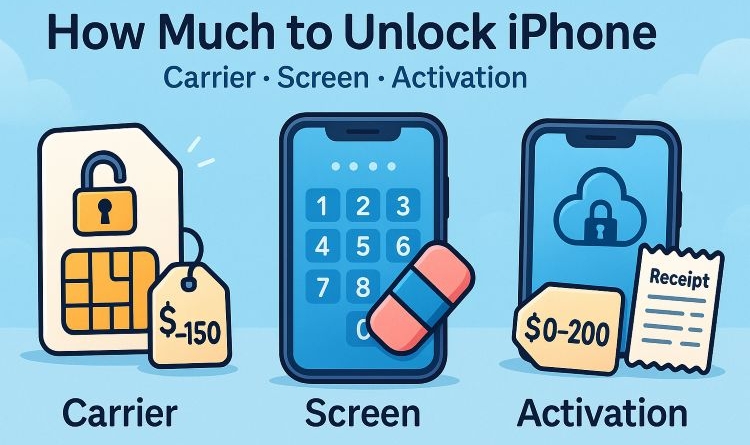
How Much to Unlock iPhone [Price Overview]
Here’s a table that shows both the free options available for every type of iPhone lock and the maximum prices you will need to pay if you go with paid services.
| Lock Type | Pricing Range |
|---|---|
| Carrier (SIM) Lock |
Free via carrier (US$0) if eligibility rules are met; About US$29.99 with Passixer; Up to US$300 via online IMEI services. |
| Screen Lock (Passcode/Face ID/Touch ID) |
Free with Apple methods (US$0); US$29.99 with Passixer software (cover up to 6 iOS devices). |
| iCloud Activation Lock |
Free with Apple’s official routes (US$0); US$29.99 with Passixer to bypass the lock with the least limitations. |
Passixer iPhone Unlocker costs only US$29.99. A single license works on up to six devices and removes every type of lock, including the unlock of screen lock, Activation screen, SIM lock and more.
How Much to Unlock iPhone Screen Lock
Removing an iPhone lock screen is possible via Apple methods and professional software solutions.
- Apple’s official routes are free.
- For using software like Passixer, you will have to purchase a license that costs US$29.99 (for unlocking six iOS devices and 7 types of locks).
Free Ways to Unlock iPhone Passcode
Apple gives you a few built-in reset paths to deal with the forgotten screen passcode. None of them cost money, but each comes with its own conditions:
| Way | Pros | Cons | Best for |
|---|---|---|---|
| Way 1. iTunes/Finder | Free and work on all iPhones and iOS versions. | Need computer + cable; Recovery mode can be tricky. | Users are comfortable with computers and button combos. |
| Way 2. Erase Option (on-device) | No computer; quick reset on iOS 15.2+. | Require Find My to be enabled and have Apple ID password. | Users on modern iPhone who know their Apple ID. |
| Way 3. iCloud Find My (browser/app) | Remote erase; don’t require the device in hand. | The locked phone must be online; need the associated Apple ID. | Users who have left the iPhone at home or are away but have iCloud access. |
Way 1. Unlock iPhone with iTunes
Requirements
You’ll need iTunes (or Finder/Apple Devices app), a USB cable, internet connection, and basic know-how of putting your iPhone into recovery mode. Your Apple ID credentials to bypass Activation Lock.
Steps to Follow
Step 1: Plug your screen-locked iPhone into the computer using the USB cable.
Step 2: Open iTunes/Finder/Apple Devices app.
Step 3: Put your iPhone into recovery mode (a cable pointing to a computer) by using these button combinations:
- iPhone 8 or later (including iPhone Air and iPhone 17): quick press Volume Up and then quick press Volume Down. Press and hold the Side button.
- iPhone 7/7 Plus: hold Volume Down and Side button together.
- iPhone 6s or earlier: hold the Home button + Top/Side button together and wait.
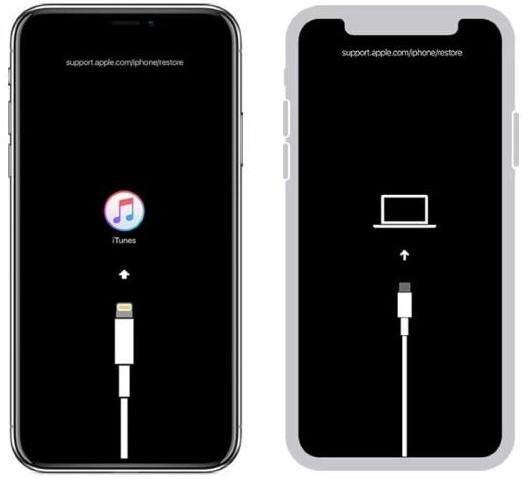
Step 4: On your computer, you’ll see a message that the iPhone is in recovery mode.
Step 5: Click Restore iPhone. The software will download and install. This takes a little time.
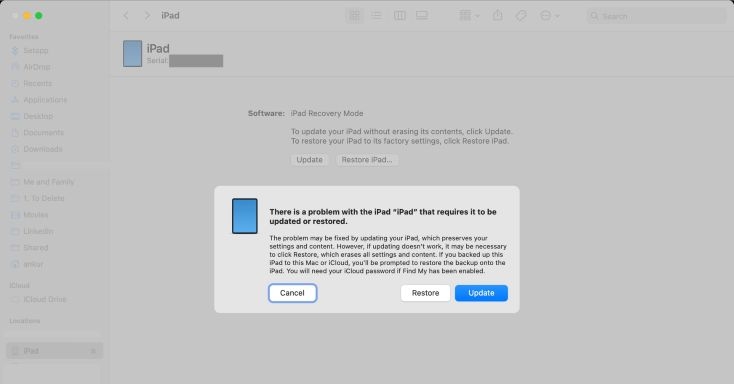
Once it’s done, your iPhone will restart and show the “iPhone Locked to Owner” screen. Simply, enter the Apple ID and password to set up iPhone without the old passcode.
Way 2. Unlock iPhone Using Erase Option
Requirements
You’ll need an iPhone running iOS 15.2 or later, connected to the internet, with Find My turned on beforehand. You must also know the Apple ID and password linked to the device to use the “Erase iPhone” option.
Steps to Follow
Step 1: Deliberately enter the wrong passcode six times. The screen will show iPhone Unavailable:
- On iOS 15.2 and later, you’ll see Erase iPhone at the bottom right.
- On iOS 17 and above, tap Forgot Passcode? Then choose Start iPhone Reset.
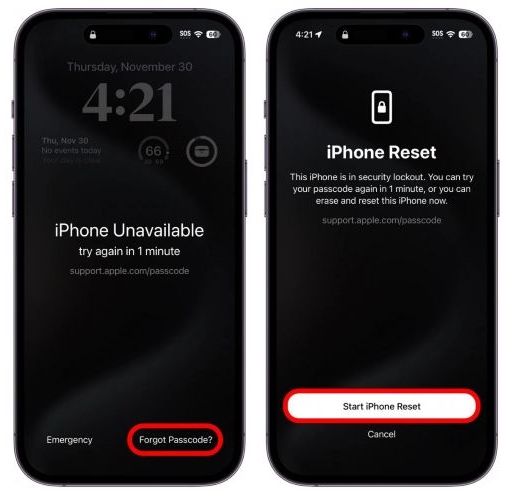
Step 2: The Apple ID signed into the device will appear. Enter the Apple ID password to continue.
Step 3: Tap Erase iPhone again to confirm.

That’s it. The iPhone erases itself and restarts fresh. Ready to set up as a new device for use.
Way 3. Unlock iPhone via Find My Feature
Requirements
Apple’s Find My feature should be turned on for the locked iPhone beforehand. Another device with the Find My app or simply a browser is required. You also need your Apple ID credentials to start the erase. The locked iPhone must be connected to the internet (Wi-Fi or cellular).
Steps to Follow
- Open Find My app on another Apple device signed in with the Apple ID used on the locked iPhone.
- Under the Devicestab, tap to see the list of all devices and select the one that is screen locked.
- Tap Erase This Device.
- Hit Continue on the next screen.
- Enter your Apple ID and password to confirm.
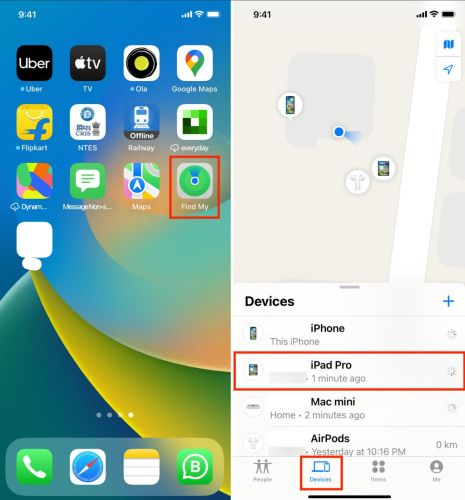
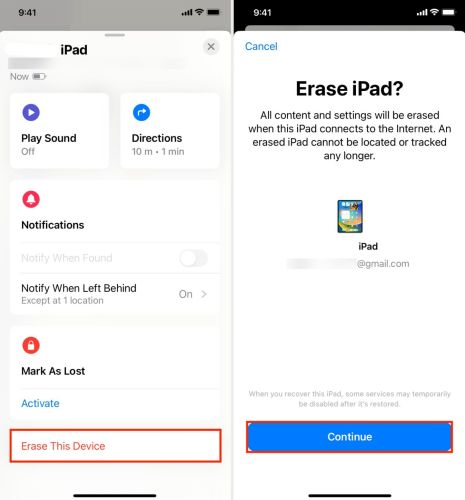
The locked iPhone will erase itself (as long as it’s connected to the internet) and remove the screen lock.
Paid Service to Remove iPhone Passcode
If you want an easy way to unlock iPhone passcode with the least limitations, then your option is Passixer iPhone Unlocker. Passixer doesn’t need your Apple ID during the screen passcode removal and allows you to unlock iPhone in a click-through process. If your iPhone is stuck on iCloud Activation Lock after the unlock, this software will help you bypass iCloud lock without Apple ID effectively.
Passixer works with every type of screen lock, from Face ID and Touch ID to 4-digit/6-digit passcode and custom code. Once the lock is gone, you can set up the iPhone as new and start using it right away. In all, Passixer is a cost-effective iOS unlocker($29.99) helping you unlock iPhone from various locks.
Steps to Use Passixer iPhone Unlocker
Install and launch Passixer on your computer and pick Wipe Passcode from the home screen.
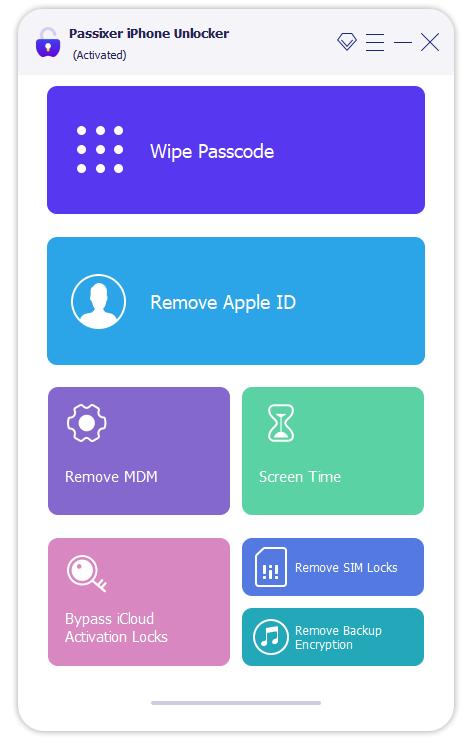
Connect the locked iPhone to the computer with the USB cable. Wait for Passixer to detect the device and show its model info.
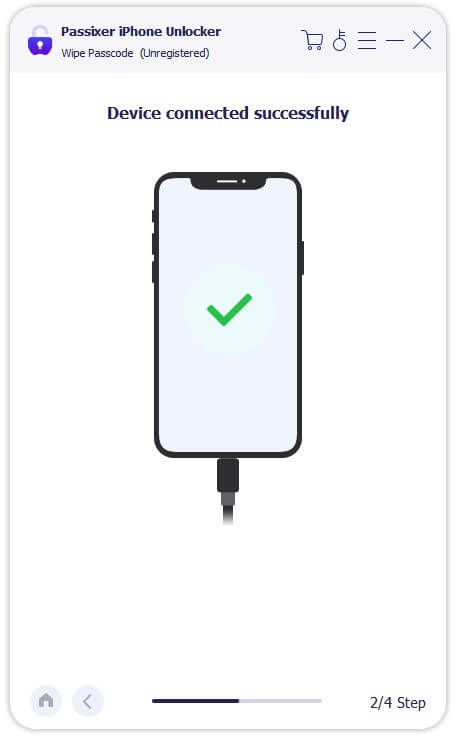
Confirm the device information. Click Start to download the exact firmware package the tool needs for the phone unlock. Let the download finish.

Enter the confirmation code shown on screen and then press Unlock to begin. The tool will run the wipe/unlock routine.

The software completes the unlock process. The iPhone reboots and the screen lock will be removed. You can then set up the iPhone as new.

How Much to Unlock iPhone from Carrier
Carrier lock means your iPhone will only accept one carrier’s SIM. And when you insert a SIM from another carrier into your iPhone, you will see “SIM Not Supported” or similar pop-ups.
You have two lanes to remove the SIM Lock: free and paid. Free options come with hard conditions like waiting for certain days while some paid options skip the waiting. For the paid services, there are two options to consider:
- A one-click style tool like Passixer, costs about US$29.99.
- Online IMEI services are another paid path, which can cost up to US$300, depending on device, carrier and urgency.
How to Unlock iPhone Carrier for Free
If you want a free carrier unlock, the only way is through the carrier itself. The rules are largely the same across carriers. What changes is the minimum active days requirement. The usual checklist you must meet:
- No unpaid bills,
- IMEI not blacklisted/reported lost-or-stolen, device paid off (if financed),
- Your account is in good standing.
U.S. carriers accept proof of military deployment for an early unlock (as per FCC policies). So, you or an immediate family member can present deployment papers at an authorized carrier store and request an exception, and they’ll fast-track the SIM Unlock.
Here’s a quick look at the main U.S. carriers and their standard requirements for the activation day:
| Carrier | Minimum Active Days |
|---|---|
| AT&T | 60 days (postpaid). Prepaid: 6 months. |
| Verizon | 60 days (devices auto-unlock after 60 days of paid active service). |
| T-Mobile (incl. Sprint) | 40 days on the requesting line (standard). Prepaid or certain financed/leased iPhone can require you to wait for longer (up to 365 days in special cases). |
Here’s How to Request a Free Unlock from Carrier (Example: AT&T)
The process is usually faster over the phone than through the website. If your iPhone has passed the minimum active-days requirement and you have no unpaid bills, here’s how to remove the SIM lock from your device.
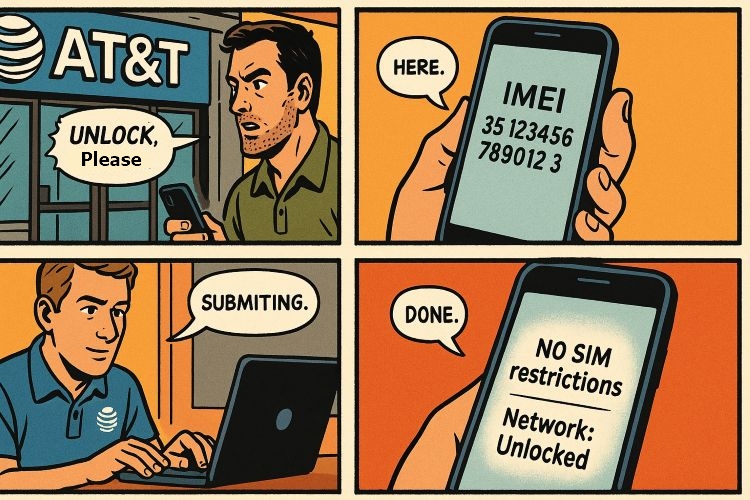
- Find the IMEI in Settings > General > About. Or dial *#06#.
- Call AT&T support. Tell them clearly you’d like to place an unlock request.
- Be ready to confirm details: account name, account number, PIN or last 4 of SSN, and device purchase date.
- A simple script you can use: “My device meets AT&T’s unlock policy — it’s been active for 60 days, paid in full, and is not reported stolen. Please submit an unlock request.”
- Once processed, AT&T will send you confirmation and further instructions you’ve to follow on the iPhone by email to remove the SIM lock.
How to Remove Carrier Lock on iPhone [Paid]
Removing the SIM Lock via the carrier is slow. Plus, it is often difficult to process the SIM unlock when you’re abroad because you cannot contact the carrier. So, if waiting isn’t an option, you can choose these two paid alternative methods to deal with the SIM lock on your iPhone.
Removing the SIM lock through third-party services is allowed in the U.S. under FCC rules (as long as your device’s IMEI is not blacklisted and there are no dues). So, you can use these paid alternatives without concern.
Way 1. Unlock iPhone SIM with Passixer [US$29.99]
Passixer iPhone Unlocker is an all-in-one iOS unlocker with a dedicated Remove SIM Lock feature. It can remove carrier restrictions from major U.S. and international carriers, such as Sprint, T-Mobile, AT&T, Vodafone and EE.
Even if you can’t reach the carrier or you’re abroad, Passixer is the quicker option. Once set up on your Mac or Windows computer, a SIM unlock typically finishes in about 1 hour. And once the SIM lock is removed, your iPhone will accept a SIM card from a new carrier.
Steps to Use Passixer to Remove SIM Lock on iPhone
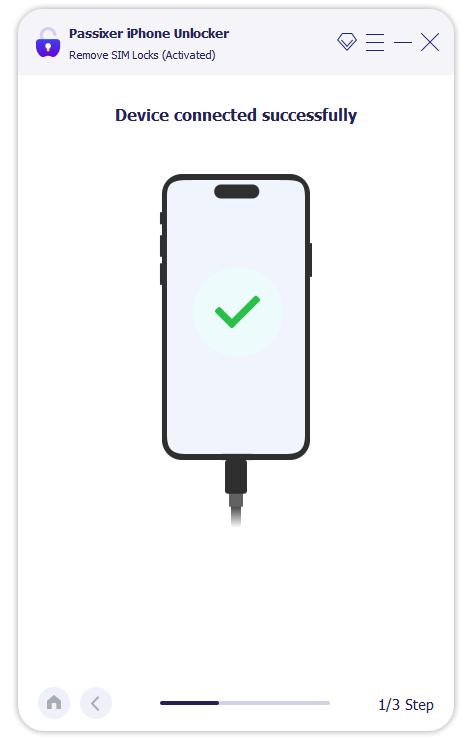
Open Passixer and pick Remove SIM Lock from the main screen.
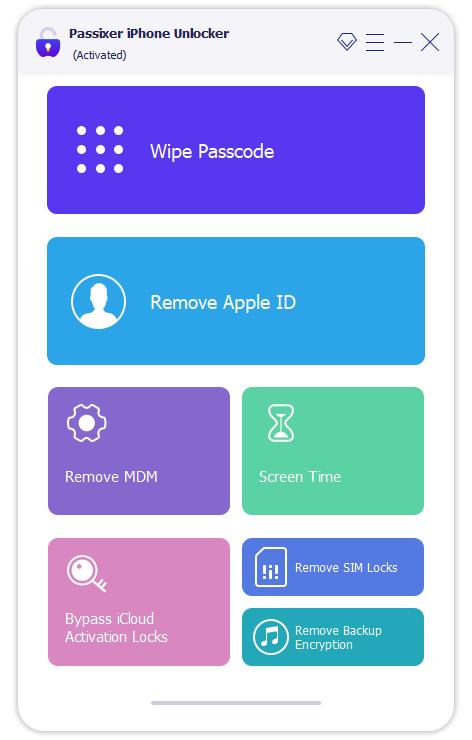
Connect the locked iPhone to your computer with the USB cable. Tap Trust if asked.
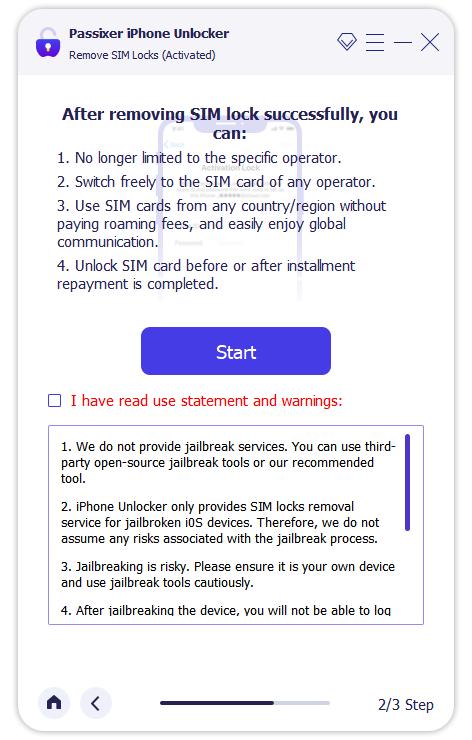
Click Start. Follow the on-screen jailbreak tutorial.
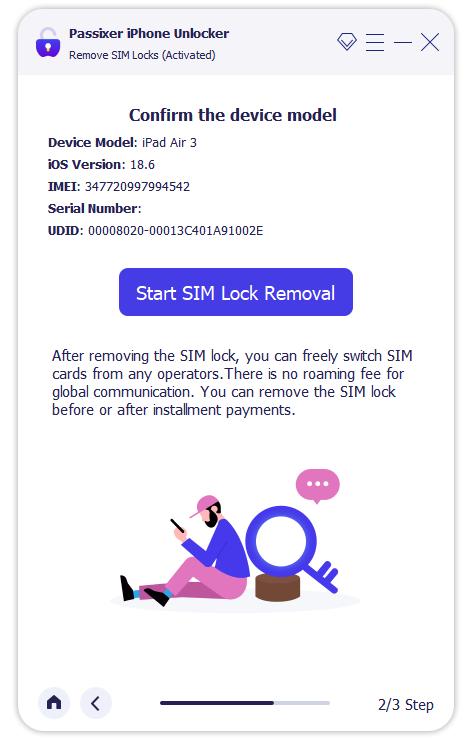
Confirm the iPhone details that Passixer shows. Click Start SIM Lock Removal.
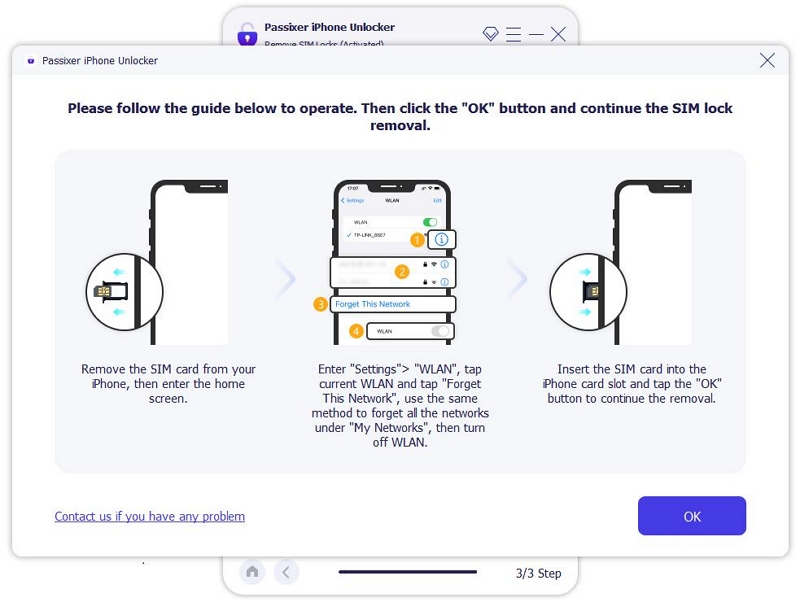
On the iPhone: remove all saved Wi-Fi networks and turn Wi-Fi off. Click OK in the app to continue. During the Wi-Fi reset, you will need to remove and install the SIM card.
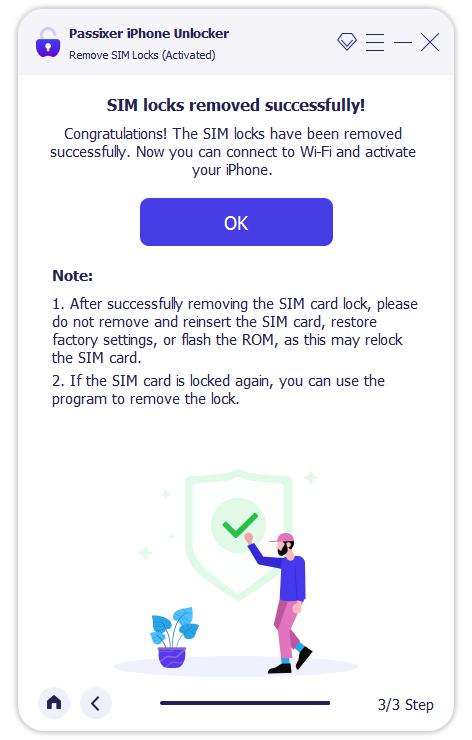
Let the tool run. Wait until it shows SIM Lock Removed Successfully.
Way 2. Unlock iPhone SIM via Online IMEI Unlockers [up to US$300]
There are hundreds of IMEI SIM unlock services on the internet and they all promise the same thing: remove your carrier lock remotely using just your device’s IMEI number. However, here’s the reality: success rates are very low with these services. In fact, almost all Reddit users simply suggest staying away from such services. Furthermore, refunds are also not given by many services.
Prices for the SIM Unlock of all services vary, depending on your iPhone model, carrier and country. Still, to give you a clearer sense of the landscape, here are five names and what they typically offer:
Comparison of IMEI Unlock Services
| Service | Typical Cost | Completion Time | Support Options |
|---|---|---|---|
UnlockRiver |
US$3.99 to US$300 | Claim 2–90 days | Email (24 hr) + 24/7 live chat |
Official SIM Unlock |
US$24.99 start; US$80–160 final cost | Claim 24–72 hrs, often weeks | Phone + email |
DirectUnlocks |
US$25–28 check; US$50–100 unlock | Advertise 1–6 days, often much longer | Email only, poor response |
UnlockBase |
US$20–60, depending on carrier/model | 5–15 days, sometimes delayed | Email, usually within 24 hrs |
CellUnlocker |
US$20–60 range | 1–5 days quoted, delays common | Live chat, phone, WhatsApp |
doctorSIM
|
US$4.95 to US$100 | 1 to 30 days | Email or live chat |
Steps to Unlock iPhone Carrier with doctorSIM
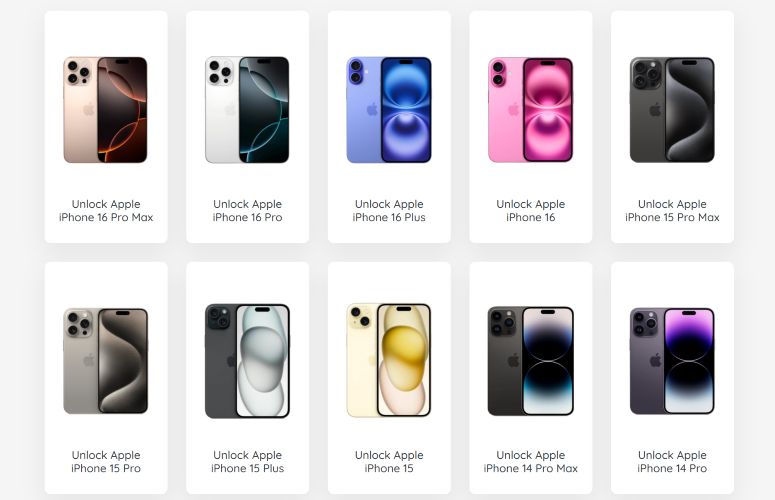
- Go to doctorSIM.com. From the grid, pick your brand (iPhone) and then select the exact model (e.g. iPhone 16 Pro Max).
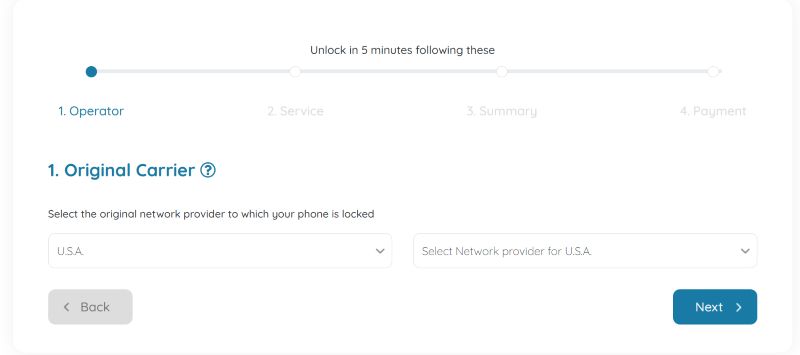
- Choose your country and the original carrier the phone is locked to. Enter your IMEI number (dial *#06# on your phone).
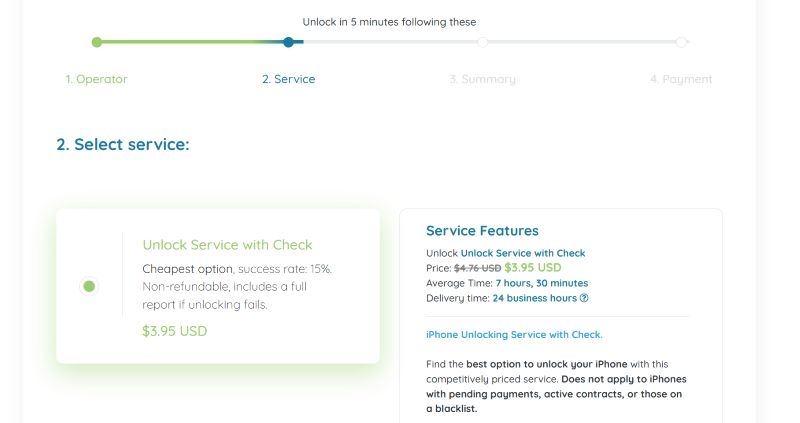
- The site will show available service options. Choose the tier and proceed.
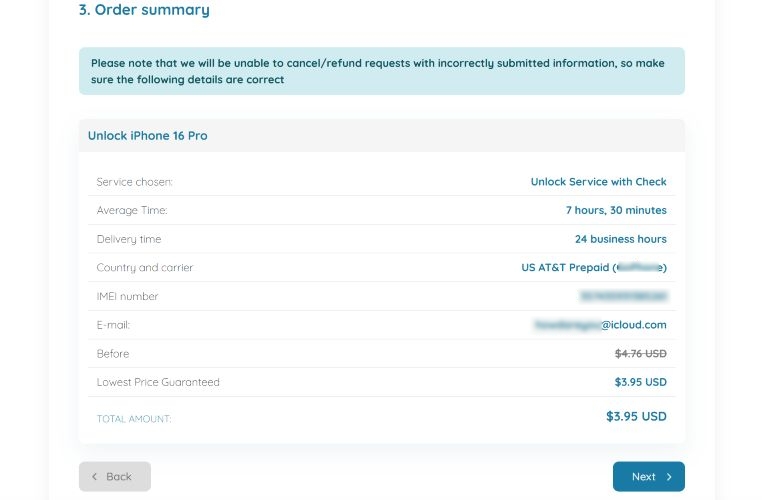
- Double-check the summary (model, carrier and estimated delivery).
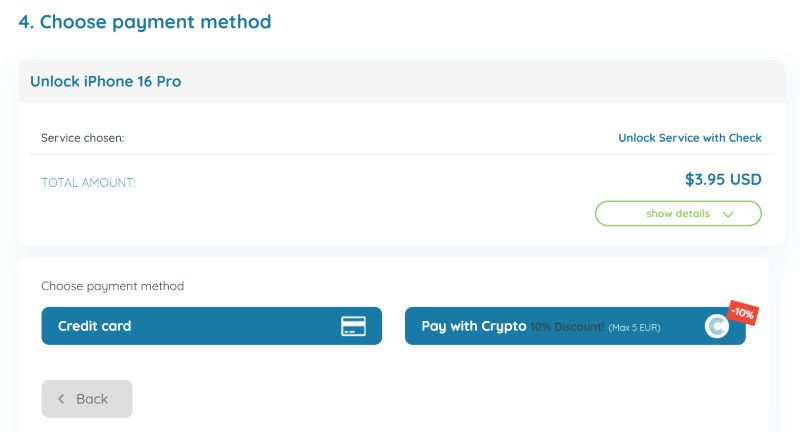
- Choose a payment method: card or crypto.
- Wait for updates by email.
How Much to Unlock iPhone in Activation Lock
Activation Lock is when your iPhone gets stuck on the “iCloud Lock to Owner” screen and blocks you from using it. There are a few ways out:
- Apple’s Official Methods: If you meet their conditions, removal is completely free..
- Passixer iPhone Unlocker: A software solution to bypass iCloud lock without Apple ID, priced at US$29.99.
Way 1. Use Apple ID or Screen Passcode
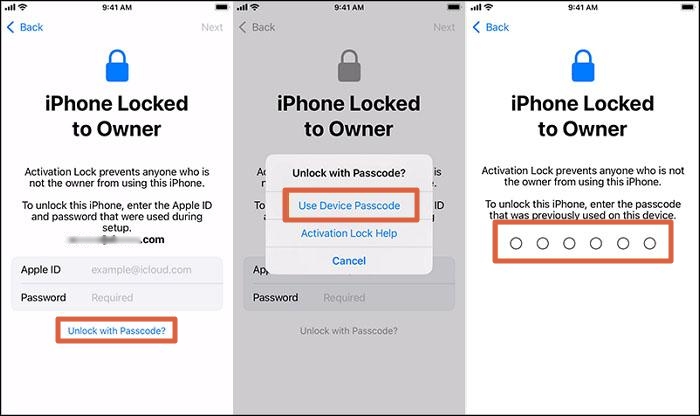
Your fastest route to deal with the Activation Lock screen is to use the credentials last used on the device. That means either the Apple ID password tied to the iPhone or the device passcode (the “Unlock with Passcode” option on iOS 11 and later builds). The iPhone should be also online (Wi-Fi or cellular) when you try this.
How to Remove Activation Lock Directly on iPhone:
- Turn on the iPhone. Enter the Apple ID and password.
- Or, tap Unlock with Passcode link and enter the device passcode used before. Then, tap Unlock.

Way 2. Through iCloud Find My
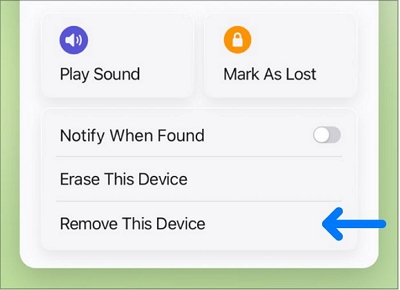
As shown earlier (in Way 3 of the Screen Lock section), you can use iCloud Find My to remotely erase a locked iPhone. After you followed those steps to erase the device, you can go one step further: use the Remove This Device option. This will remove iCloud lock on your iPhone permanently.
Way 3. Via Online Unlock Request
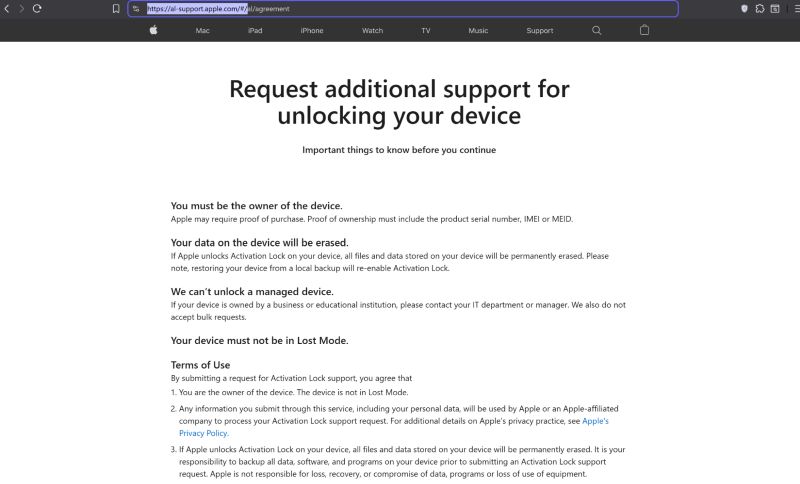
Apple also gives you a fallback if you’ve forgotten the Apple ID or passcode and are stuck at the Activation Lock screen. The process runs through their official support site: https://al-support.apple.com/#/. From there, you can start an Activation Lock support request.
Before you do, there are conditions:
- The iPhone must not be in Lost Mode.
- You must agree that data on the device will be erased.
- Most importantly, you’ll need the original proof of purchase — the invoice that clearly lists the serial number, IMEI, or MEID.
Apple is strict here. They will not accept second-hand receipts, reseller slips, or marketplace bills. If you’re not the original owner, the request will be commonly denied.
If you meet the requirements: submit the form, attach the invoice, and wait for Apple’s review. Once verified, they’ll remove the Activation Lock from their servers. And you can set up the iPhone again from scratch.
Way 4. Remove iCloud Activation Lock with Passixer [Paid]
When the official Apple route is closed, Passixer iPhone Unlocker steps in as a professional alternative. Its Bypass iCloud Activation Lock feature is built for owners who can’t reach the previous account, like if you’re a second-hand buyer or simply have lost access to the Apple ID.
Passixer is designed to make the iDevice usable again. Once the Activation Lock is removed, you can sign in to the App Store, download apps, use the camera, run WhatsApp and Instagram, etc.
Steps to Use Passixer to Remove Activation Lock
Start Passixer on your Windows or Mac machine and select the feature labeled Bypass iCloud Activation Lock from the main screen.
Attach the iPhone or iPad to your computer with a USB cable.
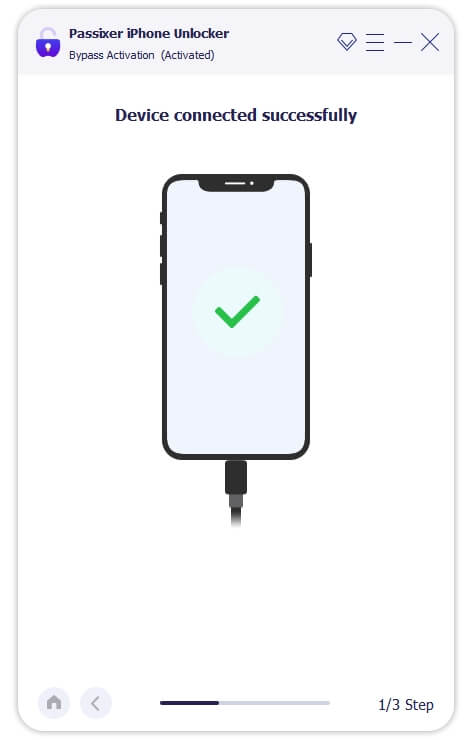
Proceed with the on-screen instructions to put the device into the jailbreak state required by the tool.
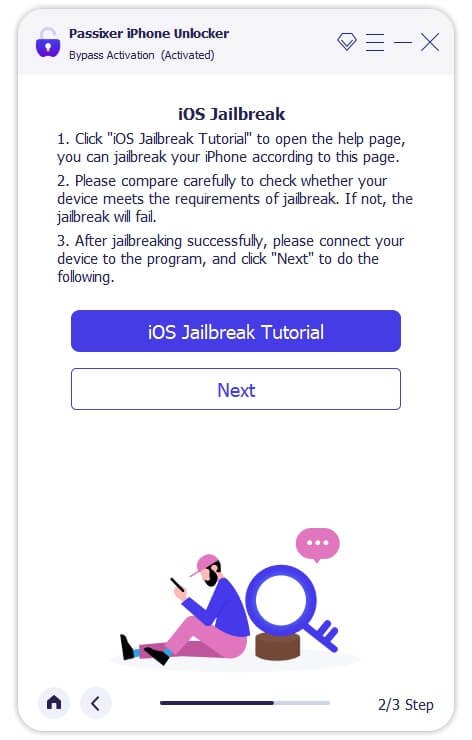
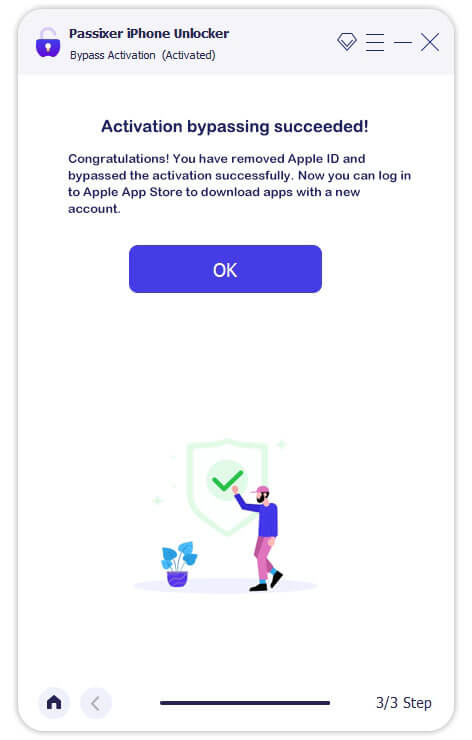
After the jailbreak completes, press Next and Passixer will perform the Activation-Lock bypass fast.
Conclusion
Bottom line on the cost of removing locks on the iPhone: Apple’s own routes cost US$0.00 but they come with a long list of requirements. Passixer comes as a professional alternative to deal with any iOS lock in just 1 hour. A one-time license costs US$29.99 and works on up to six iOS devices. It can handle all major locks:
- Screen lock: Face ID, Touch ID, 4/6-digit passcode or custom code.
- Carrier lock: work with popular U.S. or international carriers.
- Activation Lock: ideal for second-hand devices or when the original credentials are lost.
Moreover, Passixer’s success rate stays consistently high across all iOS locks, making it a trusted choice when Apple’s free routes aren’t enough.